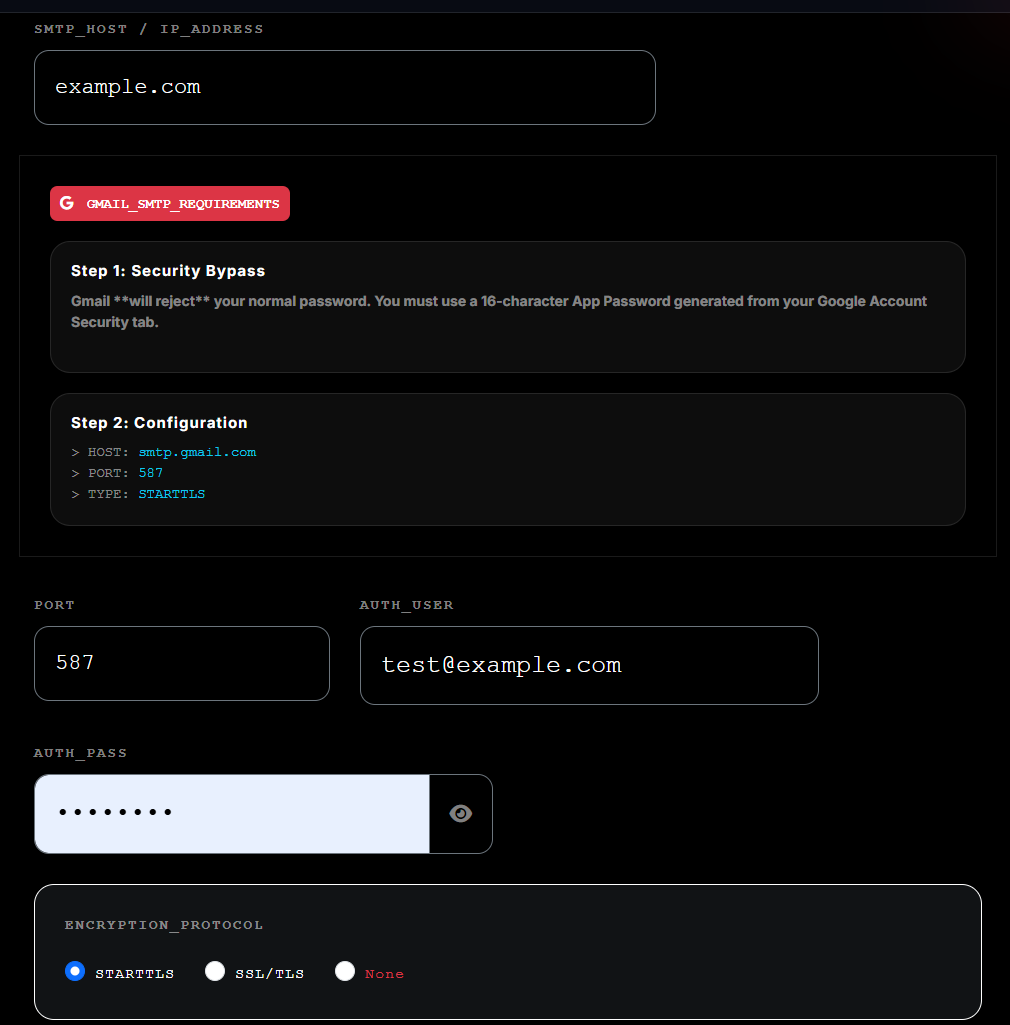
Core Infrastructure Setup
To enable high-velocity relaying, you must authorize the Firetip Native DNS records.
Alternatively, you can configure a Custom Relay to route your traffic through external
gateways such as Gmail, Hotmail, or Yahoo via the proprietary sc01 hardware cluster.
Overview
Firetip is a sovereign‑grade dispatch framework providing email, SMS, OTP, and hybrid message delivery through a unified API. Built on the SC01 identity layer, it delivers deterministic routing, isolated reputation domains, and real‑time telemetry without relying on shared cloud relays or third‑party infrastructure.
The platform exposes a consistent API surface for broadcast campaigns, transactional messaging, verification flows, and event‑driven webhooks. All dispatch operations run on Firetip’s independent execution engine, enabling operators to maintain full control over domain alignment, queue scaling, warmup behaviour, and delivery state transitions.
Firetip’s architecture separates storage, routing, and transmission layers, allowing high‑volume workloads to execute with predictable latency while preserving sovereign compliance boundaries. Developers can integrate directly via REST, SMTP bridge, or the Firetip SDK to automate outbound communication pipelines at infrastructure speed.
Architectural Components & Capabilities
- Sovereign Blaster Core: High-throughput outbound transmission engine optimized for concurrent delivery tracking.
- Domain Bridge Protocol: Isolated domain authentication matrices providing dedicated security layer verification.
- Telemetry Stream Engine: Native telemetry logging utilizing tight packet-packed configurations linked straight to the SC01 framework.
- Live State Monitoring: Real-time connection feedback and transaction listener loops operating with sub-millisecond response latency.
- Queue Elimination Routing: Predictive thread management logic preventing transactional backlog generation during intensive campaigns.
- Zero-Dependency Auditing: Built-in structural tracking mechanics that eliminate the need for third-party analytics and data-mining suites.
- Hybrid Hardware Continuity: Native hookups allowing processing pipelines to synchronize effortlessly with localized sc01 hardware nodes.
Deployment Prerequisites & Integration Context
The Firetip dispatch platform is built for execution environments requiring:
- High-volume transaction networks requiring unthrottled outbound capacity.
- Independent marketing and corporate messaging delivery infrastructure.
- Privacy-first data frameworks requiring standalone, audited data security lines.
- High-velocity transactional updates where message queue delays lead to operational bottlenecks.
- Hybrid hardware‑software structures looking to optimize physical sc01 processing setups.
- Ecosystem applications looking for native integration loops alongside sCloud storage frameworks.
Firetip Documentation & API Reference
Sovereign dispatch infrastructure for email, SMS, OTP, and hybrid routing. Built on the sc01 hardware identity layer, Firetip provides deterministic delivery, isolated domain authority, and real‑time telemetry.
API Reference Overview
Firetip Architecture
Firetip separates identity, routing, and dispatch layers to maintain sovereign control over outbound communication. All operations are anchored through the sc01 identity node, ensuring deterministic routing and isolated reputation domains.
- Identity Layer: sc01 hardware binding, domain authority, cryptographic signatures.
- Routing Layer: deterministic path selection, queue shaping, priority enforcement.
- Dispatch Layer: email/SMS/OTP execution, streaming pipelines, real‑time telemetry.
- Storage Layer: sovereign data partitioning, zero shared‑cloud contamination.
Quick Start Guide
- Provision your domain via the Domain Bridge API.
- Configure DNS (SPF, DKIM, DMARC) to activate Triple‑Auth.
- Open a streaming channel using the Delivery Pipeline.
- Register a webhook for real‑time verification events.
- Monitor cluster health using Cluster Triage.
sc01 Hardware Identity Layer
The sc01 node is the cryptographic anchor for all Firetip operations. Every outbound event is signed, validated, and routed through this hardware identity layer.
- Hardware‑bound identity: non‑spoofable routing signatures.
- Reputation isolation: each domain maintains its own authority profile.
- Zero shared‑cloud exposure: no cross‑tenant contamination.
- Real‑time telemetry: millisecond‑accurate event reporting.
Firetip REST API Index
Complete reference for all REST endpoints powering Firetip’s sovereign dispatch engine. Includes provisioning, routing, dispatch control, telemetry, and administrative cluster operations.
Identity & Domain Provisioning
Endpoints responsible for domain authority, routing identity, and sc01 hardware binding.
POST /api/v1/bridge/provision
Provision domain identity and assign routing authority.
GET /api/v1/bridge/status
Retrieve provisioning state, authority level, and DNS validation status.
DELETE /api/v1/bridge/revoke
Revoke domain authority and detach routing identity.
Outbound Dispatch Endpoints
REST endpoints for transactional messages, batch dispatching, and queue management.
POST /api/v1/email/send
Send a single transactional email via sc01 routing.
POST /api/v1/sms/send
Send SMS messages through Firetip’s GSM‑linked dispatch engine.
POST /api/v1/otp/generate
Generate and dispatch OTP codes with hardware‑bound identity.
POST /api/v1/otp/verify
Verify OTP codes using Firetip’s cryptographic validation engine.
Telemetry & Verification
Endpoints for message status, open tracking, and real‑time verification.
POST /api/v1/webhook/verification
Receive open, click, and validation events.
GET /api/v1/message/status
Query delivery, open, and verification state for any message.
Cluster Control & System Operations
Administrative endpoints for managing dispatch clusters, queues, and node health.
PUT /api/v1/cluster/triage
Pause queues, flush relays, or isolate nodes.
GET /api/v1/cluster/health
Retrieve node health, latency metrics, and cluster load.
POST /api/v1/cluster/restart
Restart a node or cluster segment.
Utility & Diagnostic Endpoints
Supporting endpoints for logs, diagnostics, and system metadata.
GET /api/v1/logs/recent
Retrieve recent dispatch logs for debugging.
GET /api/v1/system/info
Return system metadata, versioning, and hardware identity.
Authentication & Signature Verification
All Firetip REST requests must be authenticated using the SC01 Signature Header. This signature binds each request to your hardware identity and prevents spoofing, replay attacks, and unauthorized routing.
Header Format
X-SC01-Signature: <sha256_hmac>Signature Algorithm
HMAC_SHA256(secret_key, timestamp + method + endpoint + body)Required Fields
- Timestamp (UNIX)
- HTTP Method
- Endpoint Path
- Raw JSON Body
Example Payload
{
  "timestamp": 1719920041,
  "signature": "a8f2c9e1..."
}
See also: SDK Signature Examples
Error Codes & Diagnostic Responses
Firetip uses a structured error model designed for automated recovery, cluster triage, and sovereign‑priority routing.
ERR_401_AUTH
Invalid or missing SC01 signature.
ERR_429_LIMIT
Rate limit exceeded or provider throttle (external SMTP mode).
ERR_503_SYNC
Cluster temporarily unavailable during node synchronization.
ERR_007_GSM
GSM carrier rejected SMS payload or routing signature.
See also: Cluster Control API
Webhook Event Catalog
Firetip emits real‑time webhook events for delivery, verification, and identity‑bound telemetry.
Event Types
- DELIVERED: Message accepted by remote MTA.
- OPEN: Pixel‑verified open event.
- CLICK: Link interaction event.
- OTP_VERIFIED: OTP successfully validated.
- BOUNCE_HARD: Permanent delivery failure.
- BOUNCE_SOFT: Temporary delivery failure.
Example Webhook Payload
{
  "event": "OPEN",
  "message_id": "MSG-9912",
  "timestamp": 1719921123,
  "user_agent": "Mozilla/5.0",
  "ip": "82.21.44.19"
}
See also: Verification Listener
Message Object Schema
All Firetip dispatch operations use a unified message schema for email, SMS, and OTP workloads.
{
  "message_id": "MSG-4421",
  "type": "email | sms | otp",
  "to": "user@example.com",
  "subject": "optional",
  "html": "optional",
  "text": "optional",
  "status": "QUEUED | SENT | DELIVERED | OPEN | FAILED",
  "timestamp": 1719920041,
  "metadata": {
    "campaign_id": "CMP-8842",
    "sc01_node": "SC01-442",
    "priority": "standard | sovereign"
  }
}
See also: Dispatch API
Rate Limits & Throughput Profiles
Firetip uses dynamic throughput scaling based on domain authority, sc01 warmup state, and cluster load.
- Warmup Mode: 50–500 msgs/min
- Standard Mode: 5,000–20,000 msgs/min
- Sovereign Priority: 50,000+ msgs/min
- External SMTP Mode: Provider‑limited (Gmail, Hotmail, Yahoo)
See also: Delivery Pipeline
sCloud sc01 Node
Firetip is powered exclusively by sCloud sc01. High-performance hardware hybrid.
SC01 Hardware Identity Specification
The SC01 node is the cryptographic anchor for all Firetip routing, identity validation, and sovereign authority enforcement.
Core Attributes
- Hardware‑bound identity: Non‑spoofable routing signature.
- Reputation isolation: Each domain maintains its own authority profile.
- Zero shared‑cloud exposure: No cross‑tenant contamination.
- Real‑time telemetry: Millisecond‑accurate event reporting.
See also: Architecture Overview
SYSTEM INITIALIZATION
Deployment Paths
Choose your relay method to initialize the sc01 Firetip hardware.
Native vs External Relay Modes
Native Relay (Recommended)
Uses Firetip’s sovereign DNS, DKIM, and DMARC. Full Triple‑Auth authority and maximum throughput.
- Highest delivery rate
- Hardware-bound identity
- Zero shared-cloud contamination
Required: Configure your SPF, DKIM, and DMARC. This activates the Triple-Auth Pass for maximum authority.
External SMTP Relay
Ideal for low-volume requirements, custom MTAs or as a fallback route. This mode tunnels your traffic through other providers while maintaining the sc01 identity layer.
- Provider rate limits apply
- External throttling possible
- Useful for low-volume or fallback routing
Skip DNS: Use your Gmail, Hotmail, or Yahoo. The sc01-Node acts as a high-speed tunnel, bypassing Native DNS requirements.
Firetip Campaign Engine Documentation
The Firetip Campaign Engine is a high‑volume, hardware‑accelerated dispatch system designed for sovereign‑grade email, SMS, and hybrid message campaigns. It operates on top of the sc01 identity layer, ensuring deterministic routing, isolated domain authority, and real‑time telemetry.
Architecture Overview
The Campaign Engine is built on a three‑layer architecture:
- Ingestion Layer: Accepts campaign payloads via REST or Streaming API.
- Queue Shaping Layer: Applies priority, warmup rules, and sovereign routing logic.
- Dispatch Layer: Executes high‑velocity delivery through sc01 hardware.
Campaign Payload Structure
{
"campaign_id": "CMP-4421",
"batch": [
{ "to": "user1@example.com", "subject": "Hello", "html": "Hi
" },
{ "to": "user2@example.com", "subject": "Hello", "html": "Hi
" }
],
"priority": "standard | high | sovereign",
"metadata": {
"sc01_node": "SC01-442",
"warmup": false
}
}Execution Modes
- Standard Delivery: Balanced throughput with adaptive queue shaping.
- High‑Velocity Blast: Maximum throughput; bypasses shaping rules.
- Sovereign Priority: Reserved for domains with full Triple‑Auth authority.
Streaming Dispatch
Channel: /stream/v1/dispatch/execute
Protocol: WebSockets / SSE
Streaming mode is recommended for campaigns exceeding 10,000 messages.
Real‑Time Telemetry
- Queue depth
- Node load
- Delivery rate
- Open & click events
- Warmup progression
Error Handling
- ERR_503_SYNC: Node synchronization in progress.
- ERR_429_LIMIT: External SMTP provider throttle.
- ERR_007_GSM: GSM carrier rejection.
API Reference & Outbound Protocols
Domain Bridge Handshake (REST API)
Initializes identity mapping and routing parameters for custom target domains prior to launching active transmission bursts.
- Endpoint:
POST /api/v1/bridge/provision - Headers:
X-SC01-Signature: <cryptographic_hash> - Payload:
target_domain,sc01_id,routing_path
Campaign Delivery Pipeline (Streaming API)
Establishes an asynchronous execution stream for parsing and blasting high-volume campaign batches through registered nodes.
- Protocol: WebSockets / SSE
- Channel:
/stream/v1/dispatch/execute - Modes: Standard Delivery, High-Velocity Blast, Sovereign Prioritized Queueing
Live Verification Listener (Webhook Loop)
Monitors outbound confirmation signals and timestamps the exact millisecond emails are opened or validated.
- Callback: Event-Driven Webhook
- Event Frame:
LISTENING FOR VERIFICATION - Target: Java System Object Identifier Sync
Emergency Cluster Triage (System Controls)
Emergency circuit breaker route used to pause running queues, re-route stuck relays, or isolate faulty nodes under load.
- Endpoint:
PUT /api/v1/cluster/triage - Commands:
PAUSE_BLASTER,FLUSH_QUEUES,ISOLATE_NODE - Access: Super-user administrative credentials
Domain Bridge Handshake — Detailed Specification
The Domain Bridge Handshake establishes a cryptographic trust binding between a customer’s domain and Firetip’s sovereign routing layer. This operation is required before any Outbound Dispatch can be authorized.
Purpose
Validates domain ownership, initializes a trust anchor, and assigns a sovereign routing profile for all future outbound traffic.
Operational Flow
The handshake performs the following internal operations:
- Domain Validation: Confirms the caller controls the domain being provisioned.
- Signature Verification: Validates the request using the Firetip HMAC signature header.
- Routing Assignment: Allocates a sovereign routing path (primary, redundant, or high‑throughput).
- Authority Locking: Locks the domain to its routing profile to prevent spoofing or cross‑tenant contamination.
- Provisioning Record: Writes a permanent ledger entry to the Firetip trust layer.
Endpoint
POST /api/v1/bridge/provisionThis endpoint accepts a provisioning request and returns a signed confirmation that the domain has been successfully bound to its routing authority.
Headers
X-SC01-Signature: <derived_hmac_signature>Header Description
X-SC01-Signature is a request‑level HMAC signature generated using the caller’s Firetip API key. It ensures:
- Authenticity — proves the request came from a valid Firetip client.
- Integrity — prevents payload tampering.
- Replay Protection — includes a timestamped nonce inside the signature.
Payload
{
"target_domain": "example.com",
"routing_path": "primary"
}
Payload Field Documentation
- target_domain — The domain being provisioned. Must match DNS ownership records.
- routing_path — Determines which sovereign routing lane the domain will use.
Valid values:
primary,redundant,high-throughput.
Response
{
"status": "PROVISIONED",
"authority_level": "DOMAIN_LOCKED",
"timestamp": 1719920041
}
Response Field Documentation
- status — Indicates provisioning success.
Possible values:
PENDING,PROVISIONED,FAILED. - authority_level — Defines the trust state of the domain.
DOMAIN_LOCKEDmeans the domain is now cryptographically bound to its routing profile. - timestamp — Unix epoch timestamp marking the exact moment the trust binding was finalized.
Post‑Provisioning Behaviour
Once provisioned, the domain gains access to:
- Outbound Dispatch Channels
- Telemetry & Verification Streams
- Campaign Execution Pipelines
- Sovereign Routing Guarantees
Firetip PHP SDK — Official Documentation (HMAC‑SC01 Edition)
The Firetip PHP SDK provides a secure, hardware-aligned interface for interacting with the Firetip sovereign dispatch engine. All requests use the HMAC‑SC01 Signature System, ensuring zero API key exposure, payload integrity, and replay protection.
1. Installation
composer require firetip/sdk2. Initialization
<?php
use Firetip\SDK\Firetip;

$client = new Firetip('FT_LIVE_xxxxxxxx', '123', 'example.com');
?>| Parameter | Description |
|---|---|
| apiKey | Your Firetip API key (used only to generate signatures). |
| campaignId | Default campaign context for lead capture and dispatch. |
| domainKey | Optional domain routing identifier for multi‑tenant systems. |
3. Authentication Model (HMAC‑SC01)
Firetip no longer uses Authorization: Bearer.
All requests must include:
X-SC01-Signature: <hmac_signature>
X-SC01-Timestamp: <unix_epoch>
Signature Generation Steps
- Convert the payload to JSON.
- Generate a timestamp nonce.
- Build the canonical string:
<timestamp>\n<json_payload> - Compute:
HMAC_SHA256(api_key, canonical_string) - Send the hex‑encoded signature in the header.
For the full specification, see Firetip Signature Spec.
4. Error Handling
<?php
try {
    $client->sendDirectEmail(...);
} catch (FiretipException $e) {
    echo $e->getMessage();
    echo $e->getFiretipCode();
}
?>| Error Code | Description |
|---|---|
| 1001 | Unauthorized — invalid signature or API key. |
| 1002 | Malformed JSON payload. |
| 1003 | Missing required parameters. |
| 1004 | Invalid email format. |
| 1005 | Campaign not found. |
| 1006 | Domain key invalid or unprovisioned. |
| 2001 | SC01 hardware node offline. |
| 2002 | Queue saturation — outbound cluster full. |
| 2003 | Reputation drop — warmup or blocklist issue. |
5. Core SDK Methods
5.1 Capture Lead
$client->captureLead('user@example.com', [
    'full_name' => 'John Doe',
    'country'   => 'UK'
]);
Captures a subscriber into the active campaign.
5.2 Send Direct Email
Required for transactional dispatch. Authentication is handled via X-SC01-Signature and X-SC01-Timestamp headers generated from your API key.
$client->sendDirectEmail(
    $toEmail,       // string: Target address
    $subject,       // string: Email subject
    $htmlContent,   // string|int: Raw HTML or Template ID
    $recipientName, // string: Display name
    $options        // array: Configuration & routing
);
Extended $options Configuration
| Key | Type | Description |
|---|---|---|
| sender_alias | string | Custom sender display name. |
| reply_to | string | Custom reply-to address. |
| list_id | int | Target list ID (triggers list-based routing). |
| tracking | int | 1=Enabled, 0=Disabled. |
| country | string | ISO 2-letter code (en/fr/etc). |
| interest | string | Subscriber niche tagging. |
| metadata | array | JSON-serializable custom data (injected into stats). |
| priority | string | 'normal' or 'high'. |
| scheduled_at | int | Unix timestamp for delayed dispatch. |
| message_id | string | Custom 16-char hex ID for tracking. |
| retry_policy | string | 'standard' (default) or 'persistent'. |
| template_id | int | Explicit template ID override. |
| main_cta | string | Primary Call-to-Action link injection. |
| attachments | array | Array of file paths for outbound payload. |
HMAC-SC01 Authentication
Every request requires the following headers to bind the SDK to your SC01 hardware node:
X-SC01-Signature: [HMAC_SHA256(api_key, timestamp + \n + json_payload)]
X-SC01-Timestamp: [Unix Epoch]
Implementation Example
$options = [
    'sender_alias' => 'bithotel.com',//Your domain name
    'reply_to'     => 'contact@bithotel.com',//Reply to
    'list_id'      => 34,//user list id
    'tracking'     => 1,//(OPTIONAL) enable tracking
    'country'      => 'en',
    'interest'     => 'Hotel Guest',
    'metadata'     => ['user_id' => 123, 'node_id' => 'sc01'],//(OPTIONAL) Payload can be anything you like in a valid array form.
    'main_cta'     => 'https://bithotel.com?uid=876543&campaignid=123'//example link for main cta button in email.
];

$firetip->sendDirectEmail(
    'rocketman@gmail.com',
    'Bit Hotels',
    '1',//if 1 then uses your html template from your firetip account, otherwise can inject
    // html email templates directly lthough not recommended for larger templates due to api parsing.
    'John Joe',
    $options
);
5.3 Delivery Status
$status = $client->getDeliveryStatus('MSG_8842');5.4 Fetch Logs
$logs = $client->fetchLogs(50, 'errors');5.5 Node Health Check
$health = $client->checkNodeHealth();5.6 Provision a Domain Bridge
The PHP SDK allows you to provision a domain directly from your backend. This operation binds the domain to Firetip’s sovereign routing layer using the Domain Bridge Handshake.
$client->provisionDomain('example.com', 'primary');This performs the following:
- Validates domain ownership
- Assigns a sovereign routing path
- Creates a hardware‑anchored trust binding
- Enables outbound dispatch for the domain
Parameters
| Parameter | Description |
|---|---|
| target_domain | The domain to provision. |
| routing_path | Routing lane: primary, redundant, or high-throughput. |
This method uses the HMAC‑SC01 signature system automatically and communicates with:
POST /api/v1/bridge/provision
For the full handshake specification, see: Domain Bridge Handshake.
6. Multi‑Tenant Domain Routing
$dispatcher = new Firetip($apiKey, '123');

$dispatcher->setDomainKey('alpha-marketing.com');
$dispatcher->sendDirectEmail(...);

$dispatcher->setDomainKey('faigen-media.net');
$dispatcher->sendDirectEmail(...);
Each domain maintains independent warmup, reputation, and routing lanes.
7. Architecture Notes
The PHP SDK is synchronized with the Firetip sovereign dispatch engine, SC01 hardware trust layer, and sCloud routing matrices. This ensures deterministic routing, hardware‑anchored identity, and zero shared‑cloud dependencies.
8. Full Example
<?php
use Firetip\SDK\Firetip;

$client = new Firetip('FT_LIVE_998x81723acb', '123', 'scloud.xyz');

$client->sendDirectEmail(
    'user@test.com',
    'Welcome to sCloud',
    '<p>Hello!</p>'
);
?>
Campaign Delivery Pipeline — Detailed Specification
The Delivery Pipeline establishes a persistent streaming channel for high-volume outbound workloads. It is optimized for real-time queue parsing and sovereign-priority execution.
Protocol
WebSockets / Server-Sent Events (SSE)Channel
/stream/v1/dispatch/executeOperational Modes
- Standard Delivery
- High-Velocity Blast
- Sovereign Prioritized Queueing
Example Stream Payload
{
  "campaign_id": "CMP-4421",
  "batch_size": 5000,
  "priority": "sovereign"
}
Live Verification Listener — Detailed Specification
The Verification Listener receives real-time confirmation events for opens, validations, and identity checks. It is designed for millisecond-accurate telemetry.
Callback Type
POST <your_webhook_url>Event Frame
LISTENING FOR VERIFICATIONExample Webhook Payload
{
  "event": "OPEN",
  "message_id": "MSG-9912",
  "timestamp": 1719921123,
  "user_agent": "Mozilla/5.0"
}
Emergency Cluster Triage — Detailed Specification
The triage controller provides administrative-level control over active dispatch clusters. It is used to pause, flush, or isolate nodes during abnormal load or failure conditions.
Endpoint
PUT /api/v1/cluster/triageCommands
- PAUSE_BLASTER
- FLUSH_QUEUES
- ISOLATE_NODE
Example Payload
{
  "command": "ISOLATE_NODE",
  "node_id": "SC01-442",
  "reason": "latency_spike"
}